
Important Dates Gift Program FAQ
Important Dates is the term we use for Home Anniversaries + Birthdays, rather than typing that out each time. Depending on what you’ve opted in for, it could mean just Home Anniversaries or just Birthdays for you.
Reconcile Your Important Dates simply means going into your CRM and verifying that everyone you want to send a gift to appears, and no one you don’t want to send a gift to doesn’t. If there are any missing, or showing that you don’t want to send a gift to, that’s your time to email and let us know to include or exclude them on your behalf that month.
If no changes are needed, you don’t need to do anything. We’ll view the exact list you’re looking at and order accordingly.
At this time, we don’t have an automated process to alert you if a client redeems their gift, so the best way to ask is to email us at databaseco@compass.com. Be sure to include your clients names and what month their home anniversary or birthday was in!
Email databaseco@compass.com and we’ll be happy to let you know!
Great question! As a courtesy to all agents participating in the Database program, we send a monthly reminder to you to look at your Important Dates. This way, if you want to send your own card or gift on your own you have advance notice. We know it’s easy to get caught up in the day-to-day of real estate and despite not utilizing our service, we want to make sure you have a reminder if you need one.
You can confirm you’re not enrolled by looking at the second line in the email–it should read “As a reminder, since you are not currently enrolled in the automated gifting program, our team will not place orders on your behalf. “
You can confirm
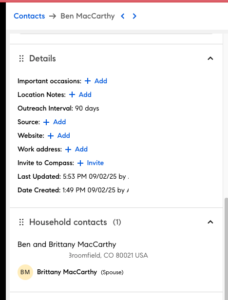
If they’re linked as Household Contacts, no, we will see that and ensure they only get one gift. To verify if they’re properly linked, simply click into one of the contacts and scroll down to the Household Contacts section on the left (example shown below). If they’re properly linked, you’ll see the corresponding client there. If you don’t see anyone, you’ll want to link them by clicking Add and following the steps to link them + create a Mailing Label.
Just respond to the email you got from databaseco@ with the clients you want to skip and we will ensure gifts are not sent to them.
Just respond to the email you got from databaseco@ with the changes you want made and we will ensure gifts are not sent to them.
No, if everything looks good no action is needed on your part.
View Sugarwish’s options here
The emails are automated to send each month regardless of if you have clients receiving them for that specific month. It’s very possible that you will look at your list and not have any to send that month. At that point, you can move on or let us know if there’s anyone who should be getting a gift from you for that month!
To review who will receive a gift, please log into your CRM and follow the steps in this Scribe
At the end of the email letting you know it’s time to reconcile your Important Dates, you’ll see a date we need to know by. It changes each month, so be sure to look at the date there.
As of right now, we only do Home Anniversaries and Birthdays, but with the expansive Compass CRM we have the ability to do other important dates as well if there’s enough interest. Email us at databaseco@compass.com letting us know what you’d like to see so we know you’d be interested in that feature!